

For SAP custom codeABAP · CDS · transactions · jobs · configuration

Your SAP custom code, documented with proof.

Know what your custom code does, how it runs and what it depends on, and see the line that proves it. A read-only export becomes a cited catalogue and a web app, in English and Spanish.

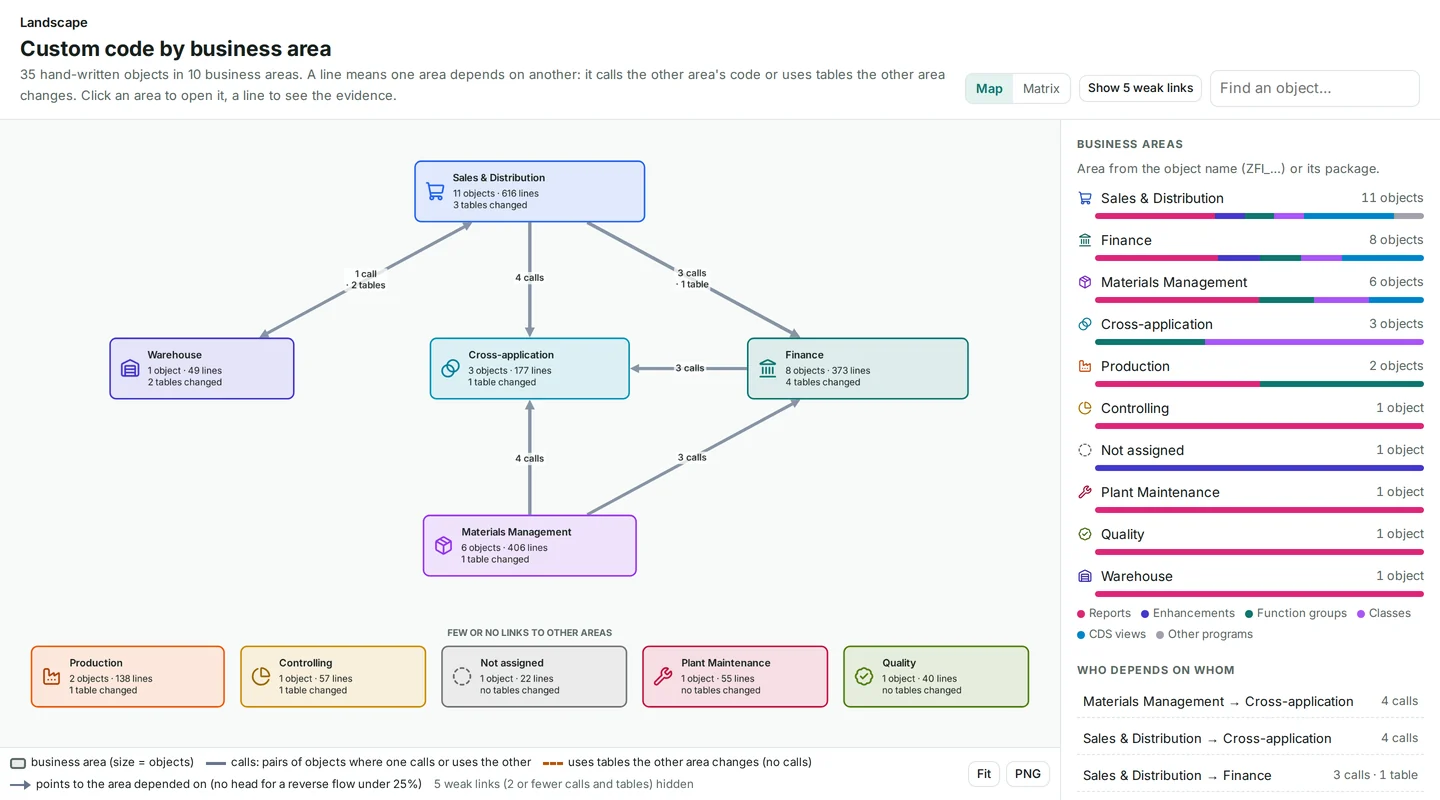
Custom code by business area: the landscape map with its heading, the dependency diagram between business areas and the list of areas.
Screens from a synthetic demo system.
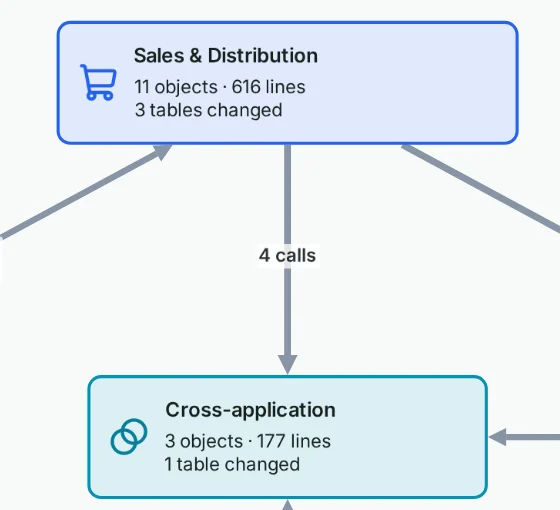
Detail of the landscape map: the Sales & Distribution area, with its object, line and changed-table counts, linked by a line of counted calls to the Cross-application area.
Screens from a synthetic demo system.

Pilot figures

Automated analysis of a productive SAP S/4HANA system.Note 1

313,202

lines of ABAP analyzed

2,387

custom objects inventoriedNote 2

13,480

relationships with verified evidenceNote 3

0

failures when re-verifying each relationshipNote 4

1 day

from export to documentationNote 5

Where the 13,480 relationships come from

12,739from a line of ABAP / CDS codecited as CODE
535from an exported configuration rowcited as EXPORT
206from the SAP where-used indexcited as EXPORT
13,480relationships, 0 failures

Plus: 14,571 ABAP Dictionary facts (tables and fields).

Code and configuration, connected

  • 84 payment methods
  • 55 payment formats
  • 7 DMEE trees
  • 19 implemented BAdIs
  • 9 CMOD projects
  • 4 IDoc message types
  • 327 BAPI calls
  • 83 maintenance dialogs
  • 4,867 SAP modification log entries

01The problem

Without documentation, every decision about custom code is a guess.

Simple questions, such as what breaks if you touch a table, cost days of analysis by a senior expert.

  • Nobody knows all the Z code.

    Consultants leave, and documentation never existed or is out of date.

    what does this function group do?

  • Every change is a risk.

    “What breaks if I touch this table?” costs days of analysis by a senior expert.

    who else writes this table?

  • Big projects start blind.

    SAP S/4HANA, clean core, an AMS switch or an audit all begin with a manual inventory.

    what exists, and what starts it?

02How it works

From one read-only report to documentation you can check.

Four steps. Each one produces something you can open and inspect.

  1. Export

    One read-only ABAP report. About 5 minutes to install as a local object, with no transport. It reads code, dictionary definitions and configuration. It reads no transactional data and no user names.

    Outputexport archive

  2. Evidence graph

    Every relationship stores file, line and confidence, and is labeled with how it was established. What cannot be resolved is listed, not forced into the graph.

    Outputevidence graph

  3. Verify

    A graph verifier replays every relationship against its source line or exported row. A deterministic citation auditor re-checks every tag. No AI in this step. A passing check proves that each citation matches its evidence, not that a business interpretation is right.

    Pilot result0 failures

  4. Catalogue, app, Ask AI

    A cited catalogue with one page per object, generated without AI. An interactive web app. Ask AI, which answers with numbered evidence.

    OutputEN · ES

03Anatomy of a citation

Every factual line carries a citation.

One sentence from the catalogue of our synthetic demo system, taken apart. Follow any tag to the evidence behind it.

A: The statement

Catalogue page, function group ZSD_ORDER, Database access

LZSD_ORDERU01 inserts into ZSD_ORDER_LOG

  1. GRAPH:CREATES

    The relationship. The evidence graph records that this include inserts into that table, with file, line and confidence tier.

  2. SCHEMA:DDIC:ZSD_ORDER_LOG

    The table. Its ABAP Dictionary definition: kind, key, fields and data elements, with its own catalogue page.

  3. CODE:lzsd_orderu01.abap:55

    The line. The exact statement in your source, numbered as in the ABAP editor (SE80).

Five tags and one marker, each with one meaning

CODE
The exact line of your ABAP or CDS source, numbered as in the ABAP editor (SE80).
GRAPH
A recorded relationship in the evidence graph, for example this program reads that table. It is always paired with the code line or exported row it came from.
SCHEMA
The ABAP Dictionary definition: a table, field, data element, domain or message.
EXPORT
A specific row of an exported file: configuration, the SAP where-used index, the transaction or job list, or the object and package inventory.
INFERRED
A deduction or a stated limit, clearly marked as not evidence.
SME-REVIEW-REQUIRED
A question for your subject-matter expert when evidence is insufficient. It is never filled in by guessing.

B: The source line

LZSD_ORDERU01 , 55

Function group ZSD_ORDER · function module ZSD_ORDER_CREATE · numbering as in SE80

47  CALL FUNCTION 'BAPI_TRANSACTION_COMMIT'48    EXPORTING49      wait = abap_true.50 51  ls_log-vbeln   = ev_vbeln.52  ls_log-channel = iv_channel.53  ls_log-status  = 'C'.54  ls_log-erdat   = sy-datum.55  INSERT zsd_order_log FROM ls_log.56  PERFORM log_event USING ev_vbeln 'Order created'.57ENDFUNCTION.
51  ls_log-vbeln   = ev_vbeln.52  ls_log-channel = iv_channel.53  ls_log-status  = 'C'.54  ls_log-erdat   = sy-datum.55  INSERT zsd_order_log FROM ls_log.

C: The check

Checked by the citation auditor. A deterministic script, not an AI, confirms the tag points to real evidence that matches it. Business purpose is confirmed by your experts.

Source drawer of the web app: include LZSD_ORDERU01, lines 44 to 57, with cited lines marked and line 55, INSERT zsd_order_log FROM ls_log., highlighted.
Source drawer. The same citation in the web app: the chip opens the source at line 55. Screens from a synthetic demo system. Full size

04Inside the web app

Ten views of your custom code, each linked to its evidence.

From a business-area map down to a single statement, in English and Spanish. Five of them below.

  1. TCODEZWM_LABELPrint picking labels

    STARTSEXPORT:cg_transactions.tsv:15

  2. PROGZWM_PICK_LABEL

    CALLS, IN UPDATE TASKCODE:zwm_pick_label.abap:40

    Unresolved point

    CALL FUNCTION gv_fm: the function name is computed at run time. Listed in Coverage, never guessed.

    CODE:zwm_pick_label.abap:32

  3. FMZSD_ORDER_STATUS_UPDATE

    WRITESGRAPH:WRITESCODE:lzsd_orderu04.abap:8

  4. TABLEZSD_ORDER_LOG
CODE:lzsd_orderu04.abap:8checked

Lines 8 to 10 of include LZSD_ORDERU04

8UPDATE zsd_order_log  SET status = iv_status9      aedat = sy-datum10  WHERE vbeln = iv_vbeln.

LZSD_ORDERU04 updates ZSD_ORDER_LOG

GRAPH:WRITESSCHEMA:DDIC:ZSD_ORDER_LOG

A slice of the evidence graph of a synthetic demo system. Every solid line is a recorded relationship; the dashed line marks an unresolved point, listed rather than recorded. One path is lit.lit pathunresolved point (CALL FUNCTION gv_fm): listed, never guessed

Readable maps, not hairballs.

  • Custom code by business area, then one area, then one object with “Impact if changed”.
  • Each area shows what starts it, which other areas it calls, and which tables it reads and changes.
  • Graphs download as images for your own documents.
Sales & Distribution area flow: what starts it, its objects by type, the other areas and SAP objects it calls, and the custom tables it changes and reads.
Sales & Distribution area. What starts it, its objects by type, what it calls and which tables it changes and reads. Screens from a synthetic demo system.

Who reads and changes each table.

  • A matrix of which custom objects insert, read, update or delete which tables.
  • Click a cell for the exact code lines.
  • The authorization objects the code checks are documented too.
Data usage matrix: custom objects in rows, tables in columns, and C, R, U or D in a cell when the object inserts, reads, updates or deletes that table.
Data usage. C, R, U or D in a cell when an object inserts, reads, updates or deletes that table. Screens from a synthetic demo system.

Process documents your experts sign off.

  • Custom code is grouped into processes by a deterministic algorithm; names come from texts recorded in SAP.
  • A Validation Package documents one process end to end in eight fixed sections.
  • AI-written documents run only with your recorded approval.
Process document VP-01, process flows: numbered steps, each line with its citation chips.
Process document from a synthetic demo system: process flows with a citation on every step.

Before your expert sees it

  1. Documentation ValidatorZero unresolvable table or field references.

  2. Validation TriadIndependent Defender and Challenger reviewer models argue; a Judge model issues binding corrections.

  3. Citation AuditorEvery tag must pass.

  4. Expert sign-offYour subject-matter expert confirms the points marked SME-REVIEW-REQUIRED and signs off, which publishes the document.

Plain-language questions, numbered evidence.

  • Ask AI cites numbered evidence and cannot add evidence of its own.
  • Each evidence item is re-checked by the citation auditor and linked to its source line; an answer with no evidence is labeled “unverified”.
  • Ask in any language; the answer comes in English or Spanish.

Answers are generated and may be incomplete; the linked code is the reference.

The app says so too.

Stated limit: Ask AI is off by default and stays off until your authorization is recorded. Every cited statement comes from your documentation. General SAP background, if any, is labeled and has no citations.

Illustration · not a recorded answer

Question

What does ZSD_ORDER_CREATE call directly, and which tables does it change?

AI-written In its own source, ZSD_ORDER_CREATE calls ZSD_ORDER_CHECK_CREDIT evidence E1 and BAPI_SALESORDER_CREATEFROMDAT2 evidence E2. It also calls BAPI_TRANSACTION_ROLLBACK evidence E3 and BAPI_TRANSACTION_COMMIT evidence E4, and it inserts rows into ZSD_ORDER_LOG evidence E5. Not covered here: calls inside the form routines it performs, and calls whose names are computed at run time.

Evidence (5)

  1. E1:LZSD_ORDERU01 calls ZSD_ORDER_CHECK_CREDIT GRAPH:CALLS CODE:lzsd_orderu01.abap:18 checked
  2. E2:LZSD_ORDERU01 calls BAPI_SALESORDER_CREATEFROMDAT2 GRAPH:CALLS CODE:lzsd_orderu01.abap:33 … recorded in the SAP where-used index EXPORT:cg_xref_cross.tsv:2checked
  3. E3:LZSD_ORDERU01 calls BAPI_TRANSACTION_ROLLBACK GRAPH:CALLS CODE:lzsd_orderu01.abap:44 … EXPORT:cg_xref_cross.tsv:3checked
  4. E4:LZSD_ORDERU01 calls BAPI_TRANSACTION_COMMIT GRAPH:CALLS CODE:lzsd_orderu01.abap:47 … EXPORT:cg_xref_cross.tsv:4checked
  5. E5:LZSD_ORDERU01 inserts into ZSD_ORDER_LOG GRAPH:CREATES SCHEMA:DDIC:ZSD_ORDER_LOG CODE:lzsd_orderu01.abap:55 checked
Illustration built from evidence lines of the synthetic demo system. No AI was called to make it.

The unresolved points, listed.

  • Dynamic calls, dynamic SQL and targets outside the export are listed, never forced into the graph.
  • “No code updates this table” is written only after checking, and says what stays invisible.
  • A coverage register counts what was documented against what was exported.

Illustration · not a recorded answer

Not resolved by static analysis

Kind, What it meansWhereEvidence
dyn call functionCALL FUNCTION with a computed nameZWM_PICK_LABELCODE:zwm_pick_label.abap:32
void function modulefunction module called but not found in the exportZMM_PURCHASE(ZSRM_PO_NOTIFY)CODE:lzmm_purchaseu03.abap:17
dyn file pathfile path computed at run timeZFI_BANK_STATEMENT_LOADCODE:zfi_bank_statement_load.abap:24
  • Kind: dyn call function

    What it means: CALL FUNCTION with a computed name

    Where: ZWM_PICK_LABEL

    Evidence: CODE:zwm_pick_label.abap:32

  • Kind: void function module

    What it means: function module called but not found in the export

    Where: ZMM_PURCHASE(ZSRM_PO_NOTIFY)

    Evidence: CODE:lzmm_purchaseu03.abap:17

  • Kind: dyn file path

    What it means: file path computed at run time

    Where: ZFI_BANK_STATEMENT_LOAD

    Evidence: CODE:zfi_bank_statement_load.abap:24

INFERREDAn unresolved point is never guessed: the statement stays listed with its line, so a reader can check it.

Illustration based on the Coverage view of the synthetic demo system.

05Security & data

Read-only by design. AI only with your authorization.

Six facts for your security and data-protection teams. No badges we do not hold.

Export

Read-only export

One ABAP report with no database INSERT, UPDATE, MODIFY, DELETE or COMMIT. Its only output is the export files, written to a directory you choose.

Product: Display authorizations S_DEVELOP and S_TABU_NAM / S_TABU_DIS, plus S_DATASET to write the files (or S_GUI for a PC download). Tables the user may not display are skipped and logged.


Data

No user names, no transactional data

Author, changed-by and every other user-name column are removed. It reads code, dictionary definitions and configuration, never orders, invoices or postings.

Stated limit: IDoc partner profiles are included by default and contain partner numbers (customer, vendor and bank numbers). One checkbox, “Include IDoc partner profiles”, leaves them out. The documentation never writes partner numbers.

AI

AI only with your recorded authorization

The graph, the catalogue and the process map are built without AI. Validation Packages and Ask AI run only with your explicit, recorded authorization; Ask AI is off by default.

Product: Each Validation Package run needs a recorded authorization naming an approver.

Redaction

Personal data in comments and strings redacted before any AI step

Names after author labels, SAP user IDs, e-mail addresses, phone numbers and IBAN-like numbers in comments and strings are redacted line by line.

Product: Code stays unchanged, so citations still resolve. Each redaction is recorded for approval.

Access

Sign-in required, accounts created by an administrator

Every page and API of the web app requires sign-in. There is no self-registration.

Product: One-time passwords are valid for 72 hours and must be replaced at first sign-in. Sessions end after 12 hours idle or 7 days.

Verification

Every citation re-checked by a deterministic auditor

A script, not an AI, re-checks every tag on every catalogue page.

Product: The app shows the result next to each citation: checked, or a warning.

06Use cases

Five moments when you need to know what the code does.

  • SAP S/4HANA and clean core

    What exists, how it runs and what it depends on: smaller remediation scope, data-driven decisions.

    Where to lookLandscapeEntry pointsConfiguration

  • Faster, safer changes

    Impact in minutes: table, program, job and transaction, with the line of code for each step.

    Where to lookData usageExplorerEntry points

  • Lower support costs

    Incidents analyzed on a map, not from scratch. New team members productive sooner.

    Where to lookLandscapeExplorerAsk AI

  • AMS handover

    The handover documentation already exists and can be verified: fewer weeks of transfer.

    Where to lookCatalogueProcessesCoverage

  • Audit and compliance

    Which code writes to payment and finance tables, which authorizations it checks, which interfaces exist.

    Where to lookData usageInterfacesConfiguration

07English and Spanish

Two languages, one method.

Everything a reader sees is available in English and in neutral Latin-American Spanish: the web app, the catalogue, the process map and Ask AI answers. The Spanish catalogue has the same pages, links and citation tags, and is audited the same way.

Translated

  • Web app, sign-in pages and messages
  • Catalogue and process map
  • Ask AI answers and their evidence lines
  • Validation Packages, as a verified translation

Never translated

  • SAP object names and code
  • Table and field names
  • Citation tags
  • Texts exported from SAP

Stated limit: Validation Packages are written and gated in English. The Spanish version is a machine translation, served with a “verified” badge only after a tool confirms that every citation, code span, number and table is unchanged and a reviewer model checks the meaning.

EnglishZSD_ORDER · Database access

  • LZSD_ORDERU01 inserts into ZSD_ORDER_LOG GRAPH:CREATES SCHEMA:DDIC:ZSD_ORDER_LOG CODE:lzsd_orderu01.abap:55
  • LZSD_ORDERU04 updates ZSD_ORDER_LOG GRAPH:WRITES SCHEMA:DDIC:ZSD_ORDER_LOG CODE:lzsd_orderu04.abap:8
Same tags

EspañolZSD_ORDER · Acceso a la base de datos

  • LZSD_ORDERU01 inserta en ZSD_ORDER_LOG GRAPH:CREATES SCHEMA:DDIC:ZSD_ORDER_LOG CODE:lzsd_orderu01.abap:55
  • LZSD_ORDERU04 actualiza ZSD_ORDER_LOG GRAPH:WRITES SCHEMA:DDIC:ZSD_ORDER_LOG CODE:lzsd_orderu04.abap:8
The same catalogue lines in both languages. Object names, code and citation tags are never translated.

Beyond SAP. CodeGraphAI for SAP is built on CodeGraph, a technology-agnostic method for evidence-based documentation of software systems. Today SAP is its only implementation; the method applies to any codebase once a parser for its language is built.

Talk to us

08FAQ

Questions to ask before you start.

Not answered here? Write to hello@codegraphai.com. We answer with the same rule as this page: a statement, and what supports it.

How to start

  1. Initial assessment. Export, analysis and full documentation, with web app access.

  2. Subscription. Refresh after every release, AI included, plus support.

How to start

Are you an SAP partner, and who makes CodeGraphAI for SAP?

No. CodeGraphAI for SAP is an independent product of GAZUM® Technologies LLC, based in Orlando, Florida (USA). It is not affiliated with, endorsed by or sponsored by SAP SE, and holds no SAP certification. SAP product names on this site only describe the SAP systems and objects the product works with.

What exactly does the export read?

Your custom source code (programs, includes, classes, interfaces, function groups, enhancement implementations and CDS views), ABAP Dictionary definitions (structure, not table contents), the SAP where-used index in both directions, transactions, screens, the background jobs that run your programs, and process configuration such as IDoc, payment and DMEE, BAdI, CMOD and maintenance dialogs. It also reads object, package and message texts, the names of modified SAP objects from the SAP modification log, and an inventory of every customer object of the selection.

It never reads SAP standard source code, except the user-exit includes you list on the selection screen. It needs display authorizations plus permission to write its export files; tables the user may not display are skipped and logged. IDoc partner profiles are included by default and contain partner numbers; one checkbox leaves them out.

Does anything leave our system?

Yes: the export archive, which you hand over for analysis. The graph, the catalogue and the process map are built from it without AI. AI steps (writing, reviewing and translating Validation Packages, and Ask AI) send code facts and redacted source excerpts to external AI providers (OpenAI or Anthropic) through their APIs, and run only with your explicit, recorded authorization. For hosting and retention, ask us.

Which SAP releases?

The pilot ran on a productive SAP S/4HANA system. The export report is syntax-checked for ABAP 7.40 SP08, 7.50 and 7.55; release-dependent parts (CDS, DMEE, BAdI tables) are read dynamically and skipped with a log entry when they do not exist. Ask us about your release.

Which AI providers?

AI is used for three things only: writing and reviewing Validation Packages, translating them into Spanish, and Ask AI. Each runs only with your recorded authorization. The roles that write and review Validation Packages run on Anthropic Claude or on OpenAI; the Spanish translations and Ask AI use OpenAI. Ask AI requests are sent with the provider’s do-not-store setting; what the provider itself retains is set by its own terms, so ask us. Before any AI step, personal data in comments and strings (names after author labels, SAP user IDs, e-mail addresses, phone numbers, IBAN-like numbers) is redacted. The graph, the catalogue and the process map are built without AI.

What happens to what cannot be resolved?

It is listed. Dynamic calls, dynamic SQL, targets outside the export and statements that could address either a database table or an internal table appear as unresolved points in Coverage. Questions the evidence cannot settle are marked SME-REVIEW-REQUIRED for your expert. None of it is filled in by guessing.

How do refreshes work?

There is no live connection to SAP. After a release you run the export again. The new documentation is built and verified separately, in both languages, before it goes live; the previous version is archived and can be rolled back. User accounts, approvals and Validation Packages are kept; a regenerated Validation Package must pass the gates again.

Is everything in Spanish?

Everything a reader sees can be in neutral Latin-American Spanish or in English: the web app, the sign-in pages, the catalogue, the process map and Ask AI answers. Validation Packages are written and gated in English and served in Spanish as a verified translation. SAP object names, code, table and field names and citation tags are never translated.

A guided demo with our team: the web app, the evidence graph and a cited catalogue page.